“How do I choose between Copilot vs. ChatGPT vs. Claude?” is the question I hear in almost every AI conversation I have with clients right now. And I’ve had somewhere around 50 of those conversations in the last month. So, it’s on everyone’s mind. But my answer is always the same: Stop asking which AI tool you should pick, and start asking, What business outcome am I trying to get?
Key Takeaways
- Picking a tool before you’ve picked a use case is the most common mistake we see when a new client asks Teal for help with AI.
- The right AI tool might be the one that sits closest to your business data, because data is what gives an AI tool context to work with.
- Microsoft Copilot gives licensed users a choice between OpenAI’s models and Anthropic’s Claude models, while a standalone Claude subscription only includes Anthropic’s models.
- Claude’s enterprise plan now includes data loss prevention (DLP) controls that block confidential information – like Social Security numbers or medical records – from ever entering a prompt.
Table of Contents
Why You Shouldn't Start with the Question, “Which AI Tool is the Best?”
Almost every AI conversation I have with a client starts with, “Reid, which AI tool should I use?” Like I alluded to in the intro, that’s the wrong place to start because AI is a piece of technology like any other. And a tool only matters in relation to the business outcome it’s supposed to produce.
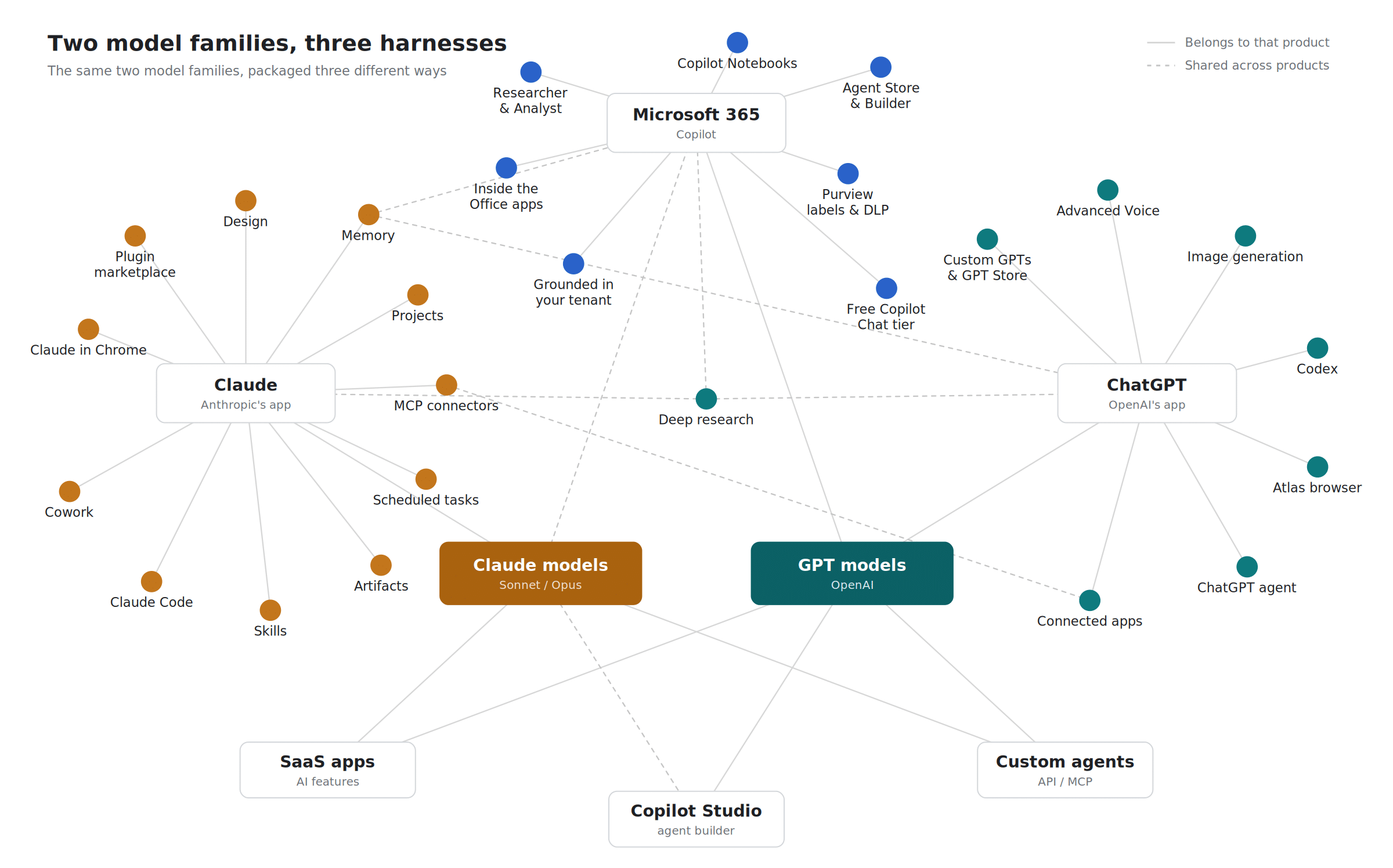
I built a visualization a few weeks ago (I’m a visual person, so I used one of these AI tools to help me build it) specifically to walk clients through. There are a ton of features, but you shouldn’t start with a feature comparison of Copilot, ChatGPT, and Claude.
You should begin by identifying the use case:
What are we trying to do? Grow revenue? Make better decisions? Find information that’s buried somewhere in our business faster?
Once you know the answer, then you can have the tool conversation.
How to Find the Right AI Use Case for Your Organization
Regardless of whether you’re a midmarket company or an association, you should start with the outcome you want. Then, work backward to the use case.
If you’re a small business, you probably want revenue growth (it’s almost always the first thing clients bring up to me). So, I ask them, what grows your revenue:
- More time for the team to sell?
- Personalized outreach at scale?
- Faster response times to prospects?
- More opportunities identified among existing accounts?
And, to be clear, none of those tasks require an AI tool by themselves. Some of them just need a process fixed, or a step removed. It’s worth bringing up because reaching for a new tool is sometimes the wrong fix when the real problem is much simpler than that.
But once you’ve picked the use case, you can ask how AI actually helps. If you said you wanted personalized outreach, then it will help by doing tasks such as:
- Drafting emails
- Generating copy
- Researching a prospect before a call
That’s where the tool conversation finally starts. By then, it’s a much easier conversation to have.
Why You Should Choose the AI Tool Closest to Your Business Data
You should pick the tool that sits closest to the data that your use case depends on. That’s because your data is what gives AI context. I always explain to people that starting with a new AI tool is a lot like hiring a new person. They’re great at what they do, but they don’t know anything about your business yet. But the more context and training you give them, and the closer they sit to your actual data, the better they will perform.
If your organization uses Microsoft 365, that usually points to Copilot, since it already has access to SharePoint, Teams, Outlook, and OneDrive.

What is the Difference Between Copilot, ChatGPT, And Claude?
Copilot, ChatGPT, and Claude are all harnesses. By harnesses, I mean that they’re the software wrapped around a large language model (LLM) that decides:
- What the model can see
- Which tools it can use
- What rules it operates under
The three stay relatively close in capability because whichever company builds the harness, Microsoft, OpenAI, or Anthropic, can swap in a better model at any time.
The neat part about Copilot specifically is that it gives you access to both Anthropic’s and OpenAI’s models inside one subscription. A lot of people don’t realize that.
They think of Copilot as its own separate thing, when it’s really a harness that lets you choose between models depending on what you’re doing. Subscribe to Claude directly instead, and you only get Anthropic’s models.
Early on, Claude actually had an edge inside Word, Excel, and PowerPoint because it had extensions driving those apps directly. Meanwhile, during the same time, Microsoft’s own Copilot integration with PowerPoint wasn’t there yet.
Microsoft has caught up quite a bit since then. Interestingly, clients using Google Workspace often end up on Claude – even though Gemini is native to that platform. The same is true for a lot of people who stuck with ChatGPT simply because it was the first tool out of the gate back in late 2022.
However, each tool still has unique capabilities that the others don’t, so this isn’t a case where one just wins outright as the one you should pick.
What does data loss prevention (DLP) mean, and why does it matter with AI tools?
Data loss prevention, or DLP, is the system that scans what you type into an AI prompt and blocks anything confidential, like social security numbers, bank account numbers, proprietary business information, or medical records.
Claude recently added DLP controls, but only on its enterprise plan. So, you have to be on that tier to get it.
Is Claude's new AI watermark significant?
Anthropic recently started building a hidden watermark into the words and letters Claude generates. Unsurprisingly, someone posted GitHub instructions on how to strip it out within days of the announcement. I’m curious whether OpenAI or Meta will do something similar soon.
But personally, I think the watermark itself is a good move for transparency – despite knowing that it’ll get worked around by someone. I expect a lot more AI vendors to move in this direction over time.
How You Should Handle AI Tool Sprawl Across Your Team
If your team has one person using ChatGPT, another using Claude, and another using Copilot, you’re not alone. Almost every client we bring on for managed intelligence already has this exact situation. People have their favorites the same way they have a favorite between Mac and PC, and that’s fine on its own.
But what you need is a plan. An AI strategy built around business outcomes, a few guardrails on what can and can’t go into a prompt, and a way to get your whole team using whatever tool you land on. That’s where your work really lies when it comes to crafting an AI program. It’s an entirely different job than picking a tool off a comparison chart.
We put together a version of this thinking in Teal’s guide, AI Adoption Guide for Regulated Businesses. It compares the major platforms on data handling, puts a number on what ungoverned AI costs you, and lays out an adoption plan (it also includes information for nonprofits and associations).
Resource
AI Adoption Guide

Get the framework for choosing, governing, and profiting from AI as a regulated organization.
Getting an AI Plan in Place for Your Business
The tools are going to keep changing faster than you can keep up with. After all, there are AI tools in use today that didn’t exist a few months ago. And there will be new tools next year that don’t exist yet. Chasing the “best AI tool” is a losing game.
The better use of your time is deciding what outcome you’re actually trying to drive, then building a plan around it, (management and adoption included) with a tool choice that fits your data. That’s what our managed intelligence services provide. As my colleague Gar likes to say, it’s about the carpenter, not the tool.